顯示具有 javascript 標籤的文章。 顯示所有文章

星期二, 3月 06, 2012

一個高品質的js統計圖製作: highchartsjs

highcharts js: http://www.highcharts.com/
highchartjs 讓你只要寫一些簡單的javascript,就可以在你的網頁上做出漂亮的圖表
圖表涵蓋了各種常用的類型,如長條圖、圓餅圖等
特別的是它還可以用動畫展示,真的是非常花俏
有興趣的話點網址進去看看就知道多花俏了XD

它的範例及API也很豐富完善,基本需求通常只要改改範例就可以完成
不過要注意的是,若用免費版本,圖表下方會有一個他們的logo
就看介不介意囉


其他的 javascript chart library:
http://wowtree.com/tree.php?aid=864


星期一, 3月 05, 2012

[javascript] 物件存取特性


一般有在寫javascript的話,都會知道要取一個如下物件
var obj = { a: '123', b: '456' }
的a值,應該要這麼用:
console.log( obj.a );

但是,其實還有另外一個方法,就是使用類似陣列的動態存取
console.log( obj['a'] );
這是一個很方便的特性,假設你要取的物件屬性是不一定的, 我們假設是一個變數。

這時候,如果不知道可以用動態存取方法的話,你就只能這麼寫:
var attr = 'a';
var value = eval('obj.'+attr);
用eval的話,在效能和安全性的考慮上就可能不是這麼的好。

改變一下作法,若是這麼寫:
var attr = 'a';
var value = obj[attr];
這樣不就簡潔又美觀了呢?

在用json的時候,也可以很方便的這麼用
var value = json['key'] || defaultVal;
是不是很棒呢!

星期六, 12月 24, 2011

使用object embed插入音樂 - 參數設定及js控制方法


雖然很不幸的,這是IE only的東西
但是有時候也不得不用阿..

在這邊有很詳細的object參數,javascript的用法則在這邊


參數:
簡單列幾個重要的:
<object id="player" codebase="http://www.apple.com/qtactivex/qtplugin.cab"  classid="clsid:6BF52A52-394A-11d3-B153-00C04F79FAA6"  type="application/x-oleobject" width="1" height="1">
        <param name="SRC" value="b.rm"><!--文件路徑,根據需要調整-->
        <param name="AUTOSTART" value="1"> <!--自動播放-->
        <param name="LOOP" value="1"><!--循環播放-->
        <param name="volume" value="50"><!--默認聲音大小0%-100%,50則為50%-->
</object> 


javascript:
以下的player表示object的DOM Element

player.controls.play();     /*   開始撥放   */
player.controls.pause();  /*   暫停撥放   */
player.controls.stop();    /*   停止撥放   */
player.controls.next();    /*   下一首音樂   */

player.URL = url;   /* 將音樂的來源設為url,這個動作會馬上執行,不需要先stop在play */


  *注意:此方法只適用於IE

[jquery] 強制使用跨域(cross domain) Ajax


很簡單,就只有一行code

$.support.cors = true;

不過別以為這樣就真的可以無視瀏覽器限制XD
只是當你有特別為cross domain設定時,這個才有用

不然還是會噴錯誤的!

星期六, 10月 01, 2011

javascript/jquery剖析網址 - parseUri(parseUrl)

這個parseUri是我修改Steven Levithan而成的

為了看起來整齊點,我將parseUri包在jquery下
不過其實並沒有用到jquery的東西,大家覺得用不順手可以自己改改


javascript中使用print_r

有用過print_r的php開發者都知道他的好用XD
這邊實現了js的print_r : http://phpjs.org/functions/print_r:493

其實這個網站(http://phpjs.org/functions/index)也有很多其他的函式
有興趣可以晃晃!

星期四, 9月 08, 2011

javascript的XML操作

不否認這個問題是寫Titanium的時候才遇到的XD
真的沒什麼用js操作xml的機會,剛好也趁機學習了

這邊有很完整的 DOM Level 2 API 的方法,不過沒有怎麼使用,也沒有XPath
http://www.w3.org/TR/DOM-Level-2-Core/ecma-script-binding.html


而W3school的就超完整 API和範例都有了~  大推!
XML DOM Reference : http://www.w3schools.com/dom/dom_nodetype.asp
XPath Tutorial : http://www.w3schools.com/xpath/xpath_examples.asp


xml中Node和Element的區別
http://blog.csdn.net/wcydiyi/article/details/4432636


javascript的XPath用法,個人是覺得不錯 不過因為最後沒用到沒有細看
https://developer.mozilla.org/en/Introduction_to_using_XPath_in_JavaScript


因為用XPath一直有問題,最後我是用getElementsByTagName完成的
getElementsByTagName在W3school可以找到用法

這邊也有一點點例子
http://developer.51cto.com/art/200902/109968.htm


另外提一下
Titanium的documentElement要用XPath的話,是使用evaluate而不是selectNodes
要取element裡面的值是用 .text 而不是 .textContent
這些是跟w3school的API有一點不同的

或許還有其他的,不過有遇到的就這些!
也歡迎大家補充!


星期四, 9月 01, 2011

jquery plugin (3)


jsTree: 做樹狀圖的plugin,有點複雜不過功能很齊全,支援ajax、crrm等
http://www.jstree.com/documentation

jquery.hotkey: 熱鍵plugin,可以簡單實現網站上如ctrl+w的自訂功能
https://github.com/jeresig/jquery.hotkeys/blob/master/jquery.hotkeys.js

jquery.cookie
https://github.com/carhartl/jquery-cookie/blob/master/jquery.cookie.js


printf: 在js上提供類似C的printf函式
http://plugins.jquery.com/project/printf

jquery.address: 類似jquery.history,可用簡單的方式實現deep link(ajax的上一頁)
官網文件 : http://www.asual.com/jquery/address/docs/
不錯的中文API: http://julabs.me/blog/front/jquery-plugin-deep-linking-methods/
簡介: http://blog.maxiang.net/jquery-address-for-deep-linking/59/


Tiny Scrollbar : 漂亮的捲軸
http://www.baijs.nl/tinyscrollbar/


附上一個很多分類plugin的網站
http://www.open-open.com/ajax/3_Tree.htm

星期一, 8月 29, 2011

Uncaught Error: can't load XRegExp twice in the same frame

在Chrome上debug會出現 Uncaught Error: can't load XRegExp twice in the same frame 已經不是一天兩天的問題了。然而雖然有警告,程式卻都跑得好好的我也就不管它了XD
今天總算是在這裡查到原因了


Chrome: Uncaught Error: can't load XRegExp twice in the same frame


Question:

The following code will fail in both of my chromes on 2 different computers (Windows 7 both of them, Chrome 12.0.742.100).


<script type="text/javascript">
location.hash = "#one";
location.hash = "#two";
location.hash = "#three";
</script>


I feel like I tried everything. Can anyone confirm this error on chrome, and does anyone have an idea as to how I fix it? Thanks a lot.


Answer:

It works fine with me on Chrome 12.0.742.100 on Win7. I'm assuming you have installed extensions? disable all extensions (or go to incognito mode) and try to load your page again. Errors from content scripts are also displayed in the javascript console. If you are not using XRegExp on your page, probably one of the extensions does.

Edit:

The source of the exception should be located to the right. Click it to go to the script that caused the exception.

Report:
I have no clue how I cannot have thought of this. You were completely correct, it was the chrome extension "XML Viewer". Thanks.


結論就是:
很有可能是因為chrome的某些plugin造成的問題,而且使用者那邊裝什麼plugin我們也管不著
既然束手無策而且也不會造成crash,就繼續不管它囉

星期一, 6月 13, 2011

HTML5新增的陣列方法

var arr = [1, 2, 3, 4, 5];

arr.every(callback[, thisArg])
對arr內的每個值執行callback,若其中有一個結果回傳false,則函數執行結果為false
thisArg : 做為callback物件的參考
callback: function (value, index, array){ ... }

arr.some(callback[, thisArg])
對arr內的每個值執行callback,若其中有一個結果回傳true,則函數執行結果為true
thisArg : 做為callback物件的參考
callback: function (value, index, array){ ... }

arr.forEach(callback[, thisArg])
對arr內的每個值執行callback
thisArg : 做為callback物件的參考
callback: function (value, index, array){ ... }

Array.isArray(arr)
判斷arr是否為陣列

arr.indexOf(obj[, index])
從arr的索引為index(default=0)的地方開始向右搜索obj,找到傳回obj在陣列的索引,反之則傳回-1

arr.lastIndexOf(obj[, index])
從arr的索引為index(default=陣列長度-1)的地方開始向左搜索obj,找到傳回obj在陣列的索引,反之則傳回-1

arr.map(callback[, thisArg])
函數的回傳值是將arr內的每個值執行callback後,所得的回傳值陣列
callback: function (value, index, array){ ... }

arr.filter(callback[, thisArg])
函數的回傳值是將arr內的每個值執行callback,保留callback回傳true的該值所得的陣列
callback: function (value, index, array){ ... }

arr.reduce(callback[, initValue])
函數將由左至右依序將arr內的值傳入callback,preValue是上一個callback的回傳值,curValue則是目前的值。
函數的執行結果是arr最左邊的值呼叫callback的回傳值
initValue: 若是最右邊的值呼叫callback的時候,preValue=initValue
callback : function (preValue, curValue, currentIndex, array){ ... }

arr.reduceRight(callback[, initValue])
函數將由右至左依序將arr內的值傳入callback,preValue是上一個callback的回傳值,curValue則是目前的值。
函數的執行結果是arr最右邊的值呼叫callback的回傳值
initValue: 若是最左邊的值呼叫callback的時候,preValue=initValue
callback : function (preValue, curValue, currentIndex, array){ ... }

星期一, 5月 16, 2011

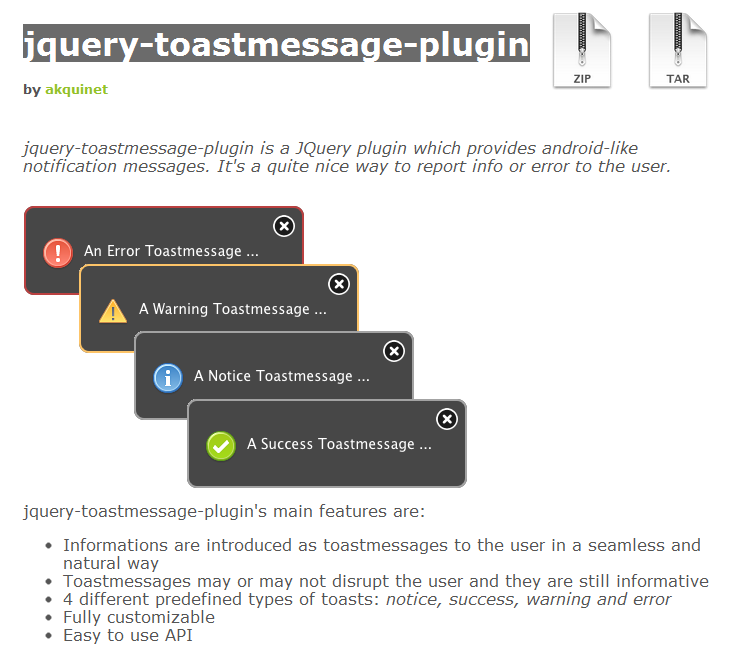
jquery toast

之前就一直在找Toast工具,恰好有看到就紀錄一下

jquery-toastmessage-plugin

星期二, 5月 03, 2011

Cufon 網頁字體渲染

想在網頁上用特殊字體就用它囉

使用 Cufon 渲染網頁字體
Cufon中文字符無法識別的解決方案

jquery上傳plugin

其實就是Uploadify,之前好像介紹過
這次又看到在紀錄一次囉

http://css9.net/t/56/
http://www.wowbox.com.tw/blog/article.asp?id=3430


另外有一個上傳效果也不錯,雖然他好像不是jquery (使用 ubr_file_upload.js )

http://www.zhuan-huan.com/convert-excel.php

星期二, 3月 22, 2011

二進位轉十六進位

最近才知道javascript的parseInt還可以設定基數XD
真是方便呀~


var val = parseInt("11111111", 2); //將 "11111111" 以2為基數剖析 , val = 255
var.toString(16); //將 val 換成16進位表示的字串

有了這兩個方法就可以簡單的完成二進位轉十六進位的程式囉

以下是我試寫的程式碼範例


<head>
<meta http-equiv="Content-Type" content="text/html; charset=utf-8" />
<title>二進位轉十六進位</title>
<script>
function convert(){
    var source = document.getElementById("source");
    var target = document.getElementById("target");
    var arr = source.value.split("\n");
    target.value = "";
    for (var i in arr )
    {
        var binval = parseInt(arr[i], 2);
        if(!isNaN(binval))
            target.value += "0x" + binval.toString(16).toUpperCase() + "\n";
        else
            target.value += "\n";
    }
}
document.onkeyup = convert;

</script>
</head>

<body >
    <h2>二進位轉十六進位</h2>
    <div style="width:50%; float:left;">
        <span style="font-size: 20px;">二進位</span>
        <textarea id="source" style="width:100%; height:400px;"></textarea>
    </div>
    <div style="width:50%; float:left;">
        <span style="font-size: 20px;">十六進位</span>
        <textarea id="target" style="width:100%; height:400px;"></textarea>
    </div>
    <div style="text-align:center;">
        <button onclick="convert()" >轉換</button>
    </div>
</body>

星期五, 3月 11, 2011

jquery tiptip

tiptip還蠻好用的,只要標籤裡加個title就好了XD
而且也蠻好看的


可是又是因為跟mbExtruder衝突=   =
在mbExtruder裡面就是不給我用((哭哭

說起來也不是非得用mbExtruder,不過這種效果的plugin似乎不常見
還是不懂得下關鍵字呢~"~

星期三, 3月 09, 2011

jquery fancybox

換了好幾個 lightbox plugin,原本已經選定用fancybox來做了
沒想到跟mbExtruder一起用的時候,發現在mbExtruder的tab開起來的時候開lightbox,tab就掛了((哭

所以只後重找適合的了
不過當時因為發現fancybox沒有像blockUI那樣的message功能,所以就自己寫了一個
需要的話放進fancybox裡就好了~


var messagebox, showbox;
    $.fancybox.message = function(html, options) {
    //first
    if(!messagebox || !messagebox) {
        $('body').append('<div style="display:none;"><div id="fbmessagebox"></div><a id="fbshowmessagebox" href="#fbmessagebox" /></div>');
        messagebox = $('#fbmessagebox');
        showbox = $('#fbshowmessagebox');
    }
    options = $.extend({}, {showCloseButton: false, scrolling: "no" }, options);
    messagebox.html(html);
    showbox.fancybox(options).click();
    setTimeout("$.fancybox.close()", 1000);
}


btw...
facebox用起來不太順手
所以目前應該是試試看shadowbox


補記
facebox雖然頗好看,可是個人覺得不太好用
基本的選標籤的部分就限制重重~"~

星期日, 3月 06, 2011

jquery 的一些 UI 組件

除了很普遍的jqueryUI之外,其實還有很多很棒的UI可以用
列出一些找到的,都很不錯

jQuery tools


還有之前提過的
mb.jQuery.components

星期六, 3月 05, 2011

jquery 圓形 plugin

$.fn.circle = function (size) {
 size = size.replace("px", "");
 var _size = size==null? Math.min(this.height(),this.width()) :size;
 this.height(_size);
 this.width(_size);
 this.corner((_size/2) + "px");
}

恰好有需要就寫了,不過好像不太實用XD
基於 http://jquery.malsup.com/corner/

星期一, 2月 28, 2011

開發 js 的一些工具

jQuery.parseJSON - 將 json 轉為 object
dump - 類似 php 裡面的 print_r / dump
JQuery Timers  - 定時器
主要有三個函式
1. everyTime(時間間隔, [計時器名稱], 函式名稱, [次數限制], [等待函式程序完成])
2. oneTime(時間間隔, [計時器名稱], 呼叫的函式)
3. stopTime ([計時器名稱], [函式名稱])


http://remysharp.com/jquery-api/ 查API的好幫手 (網頁)

jquery plugin - template

真的是很棒的東西
不過在查的時候發現其實有不止一種,而且還長的很像

試了一下,還是這種最強大,而且版本也比較新  jQuery.template()

下面的看完就大概會了
jQuery Templates Plugin筆記1
jQuery Templates Plugin筆記2
jQuery Templates Plugin筆記3
jQuery Templates Plugin筆記4
jQuery Templates Plugin筆記5
jQuery Templates Plugin筆記6
jQuery Templates Plugin筆記7
jQuery Templates Plugin筆記8

特別注意如果抓到的東西要用 html 顯示 ,是使用 {{html data}} 而不是 ${html data}